Every handloader who buys a chronograph eventually hits the same fork: the radar vs optical chronograph decision. Both give you a velocity for each shot, and for most load work both are good enough. They get there in completely different ways, though, and the differences show up in setup time, in what can go wrong on the line, and in how far you can trust a number when conditions are not ideal. This guide covers how each type works, where each one fails, and how to choose.
How an optical chronograph measures velocity
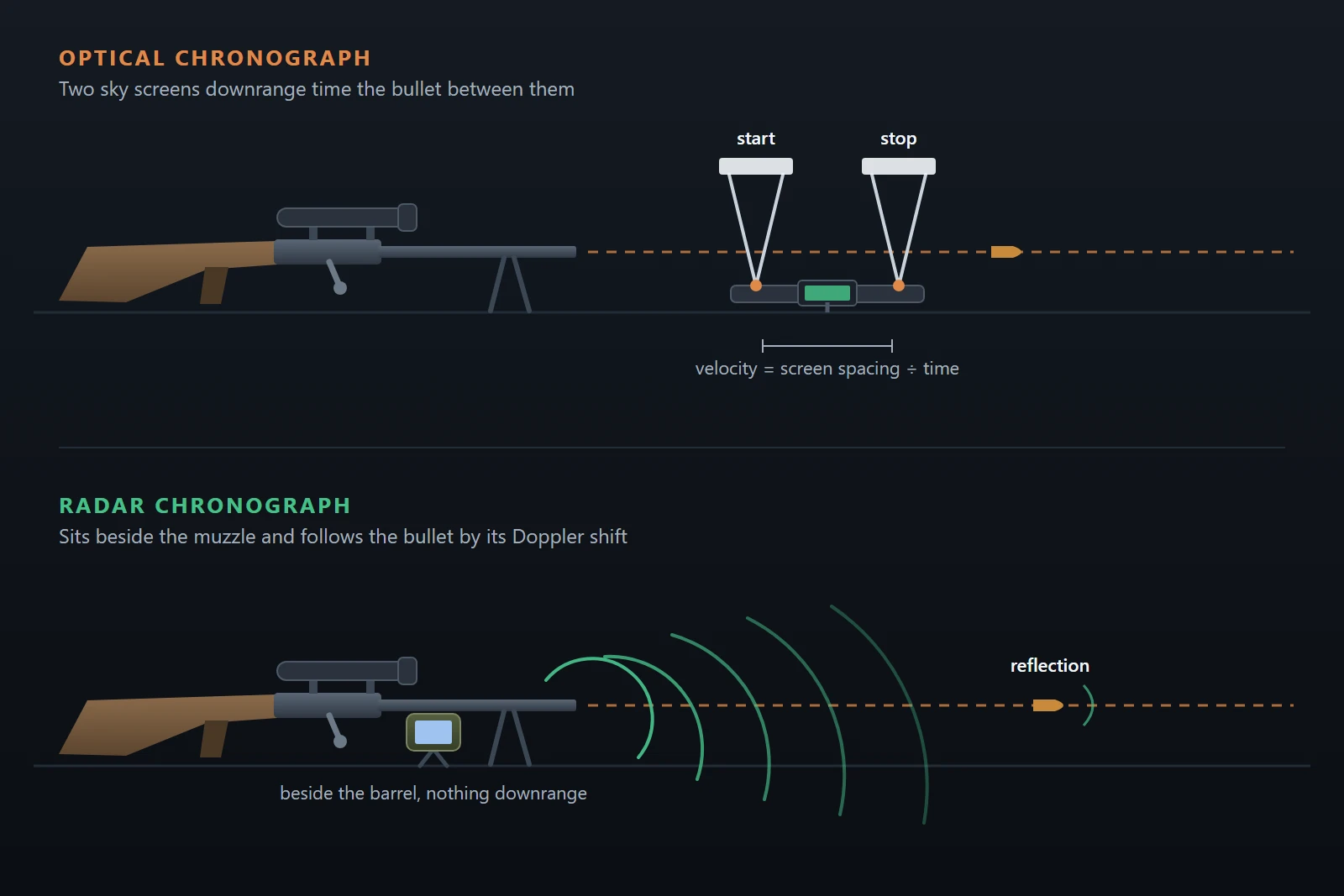
An optical unit, often called a sky-screen chronograph, sits on a base or tripod in front of the muzzle. It has two light sensors a known distance apart. When the projectile passes over the first sensor, its shadow changes the light reaching it and starts a timer. When it passes the second, the timer stops. Distance divided by time gives velocity. The principle is old and simple, which is a large part of its appeal, and it is described in general terms on the Wikipedia page on ballistic chronographs.
Because the sensors depend on a clean shadow, optical units are sensitive to lighting. Low sun behind the screens, deep shade on one sensor and bright light on the other, heavy overcast that dims the sky, and glare can all cause missed readings or odd values.
How a radar chronograph measures velocity
A radar chronograph does not look at the projectile with light at all. It transmits a continuous radio signal downrange and listens for the reflection. A moving object shifts the frequency of what comes back, which is the Doppler effect, and the unit tracks that shift as the projectile travels. Because it follows the projectile over a stretch of flight rather than timing it between two gates, it can report a velocity near the muzzle.
The practical result is that lighting stops being a variable. A radar unit works in sun, shade, dawn and dusk. It sits beside or just behind the muzzle rather than out in front of it, so there is no screen to shoot through and nothing in the line of fire.
Radar vs optical chronograph: setup and failure modes
In any radar vs optical chronograph comparison, each type has a short list of ways it goes wrong, and knowing them is more useful than comparing brochures.
Optical units
- Light. Uneven lighting across the two sensors, low sun and glare cause missed shots or bad readings.
- Distance from the muzzle. Too close and muzzle blast, gas and debris disturb the sensors or the reading. Too far and the projectile has already shed some velocity. Follow the maker’s recommended spacing and keep it the same every session.
- Alignment. The unit has to sit level and square to the line of fire, with the projectile crossing the sensor window cleanly. A crooked or wobbling stand changes the effective path.
Radar units
- Placement. Beside or just behind the muzzle, aimed downrange, level and on something stable. A unit that is tilted, loose or too far back can lose the projectile early.
- Neighbors. A radar can hear a shot from the next bench. On a busy line, keep some distance from other shooters or coordinate so only one rifle fires at a time.
- Suppressors and brakes. Radar is generally less bothered by blast and gas than a sensor sitting in front of the muzzle, which is why makers promote it for suppressed and braked rifles.
What accuracy actually matters for load development
A common worry in the radar vs optical chronograph debate is which one reads the “true” velocity. For load development that is rarely the question. What you compare is one string against another on the same device, so a steady offset from absolute truth cancels out. What does not cancel is noise: a unit that occasionally misreads a shot manufactures a flyer, and a flyer inflates both extreme spread and standard deviation.
So the better question is how repeatable a unit is in your conditions. Look for fewer dropped or odd shots, not a lower claimed error. For what spread you can reasonably expect, see what counts as a good SD for reloading, and remember that small samples mislead whichever device produced them.
Portability, cost, and when optical is still fine
On cost, the radar vs optical chronograph gap is best described in general terms: optical units are the lower cost option and radar sits in the mid to upper bands, with some premium models above that. Optical units need a stand and a bit more setup; radar units are usually smaller and quicker to place. Neither is hard to carry.
Optical is still a perfectly good choice if you shoot at a fixed bench, in steady light, without a suppressor, and mostly want an honest SD for a string. Radar earns its price if you shoot in varied light, at changing positions, with a can or brake, or at a busy range where setup time matters. If you are still deciding whether to buy at all, do you need a chronograph covers that question, and how to use a chronograph walks through the basics of a clean session.
Getting the numbers into your logbook
Whichever way the radar vs optical chronograph question goes for you, the data is only useful once it is recorded against the load that produced it. With Pro, LoadNode syncs velocities over Bluetooth from the Garmin Xero C1 and C2, pulling saved sessions from both and capturing live on the C2. See working with Garmin Xero velocity data. It also syncs the Athlon Rangecraft Velocity Pro, either from stored sessions or live while a session runs on the radar. The setup is covered in the Athlon Rangecraft Velocity Pro guide.
Any other chronograph, optical or radar, works too: type the velocities on a glove-friendly keypad, which is free. Either way you get population standard deviation and extreme spread live as you log, with flyer exclusion, so one misread shot does not quietly wreck a string.
The short version
Pick the chronograph that suits where and how you shoot, set it up the same way every time, and judge it on repeatability rather than on a headline specification. In the radar vs optical chronograph choice, neither type is wrong for load work. The better unit is the one that records every shot, so you never have to guess which readings to trust. LoadNode keeps those velocities with the load, the lots and the conditions, and never tells you what to load.
Handloading is an adult activity done at your own risk. LoadNode is a logbook and analysis tool: it never provides load data. Always develop loads from current published manufacturer data and work up safely.