Author: loadnode

  • How to Use a Chronograph

    How to Use a Chronograph

    A chronograph turns “that load felt fast” into real numbers — and those numbers are the backbone of precision reloading. But a chronograph only helps if you set it up right and read it correctly. Here is how to use a chronograph properly, from placement to interpreting your SD and ES, plus the mistakes that quietly wreck good data.

    LoadNode velocity entry, syncing or typing in shots from a chronograph

    In this guide

    What a chronograph measures

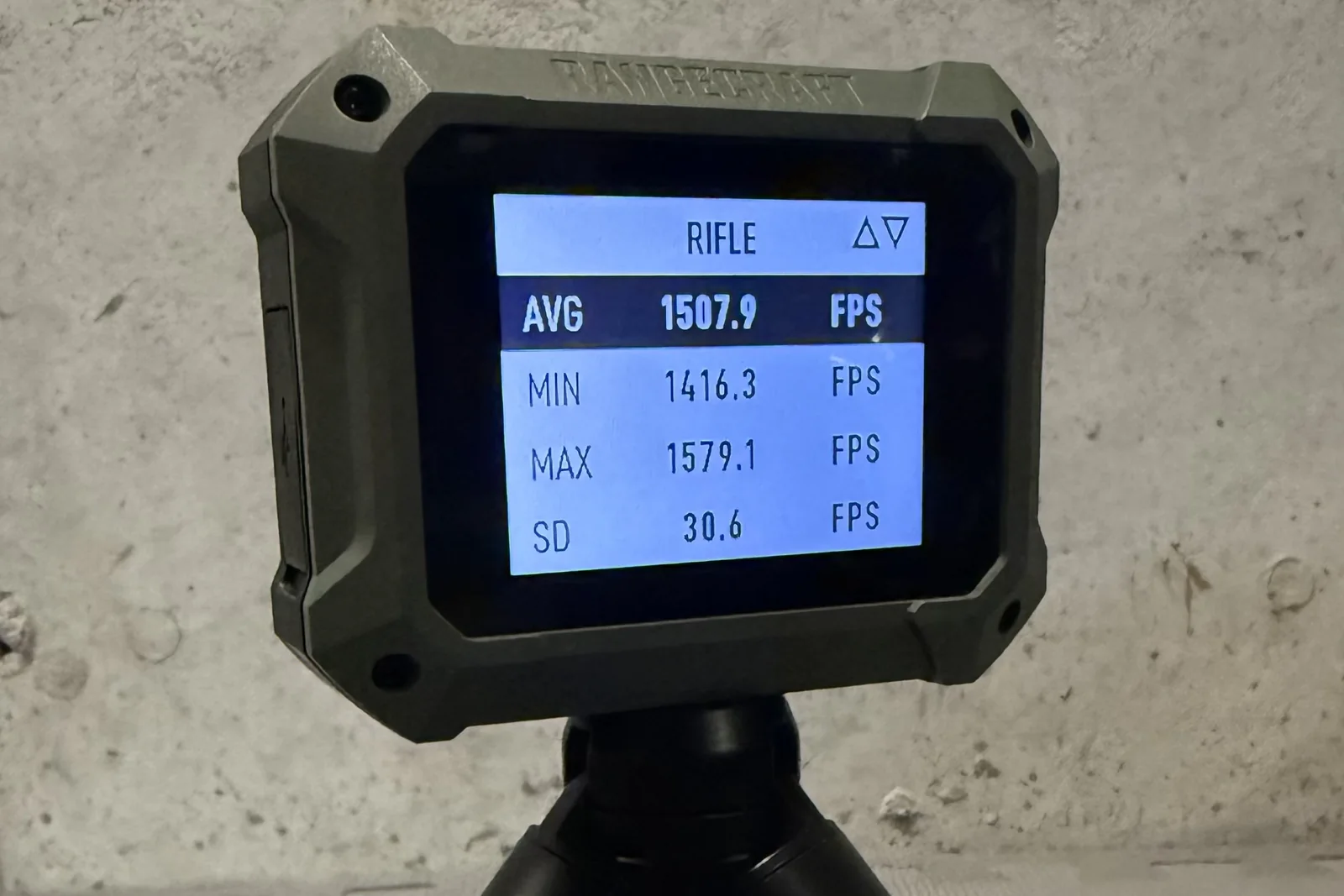
    A chronograph measures your bullet’s muzzle velocity — how fast each round leaves the barrel. From a string of shots it also computes the average, the standard deviation (SD), and the extreme spread (ES). Those consistency numbers, not just the raw speed, are what you actually act on when developing a load.

    Optical vs radar chronographs

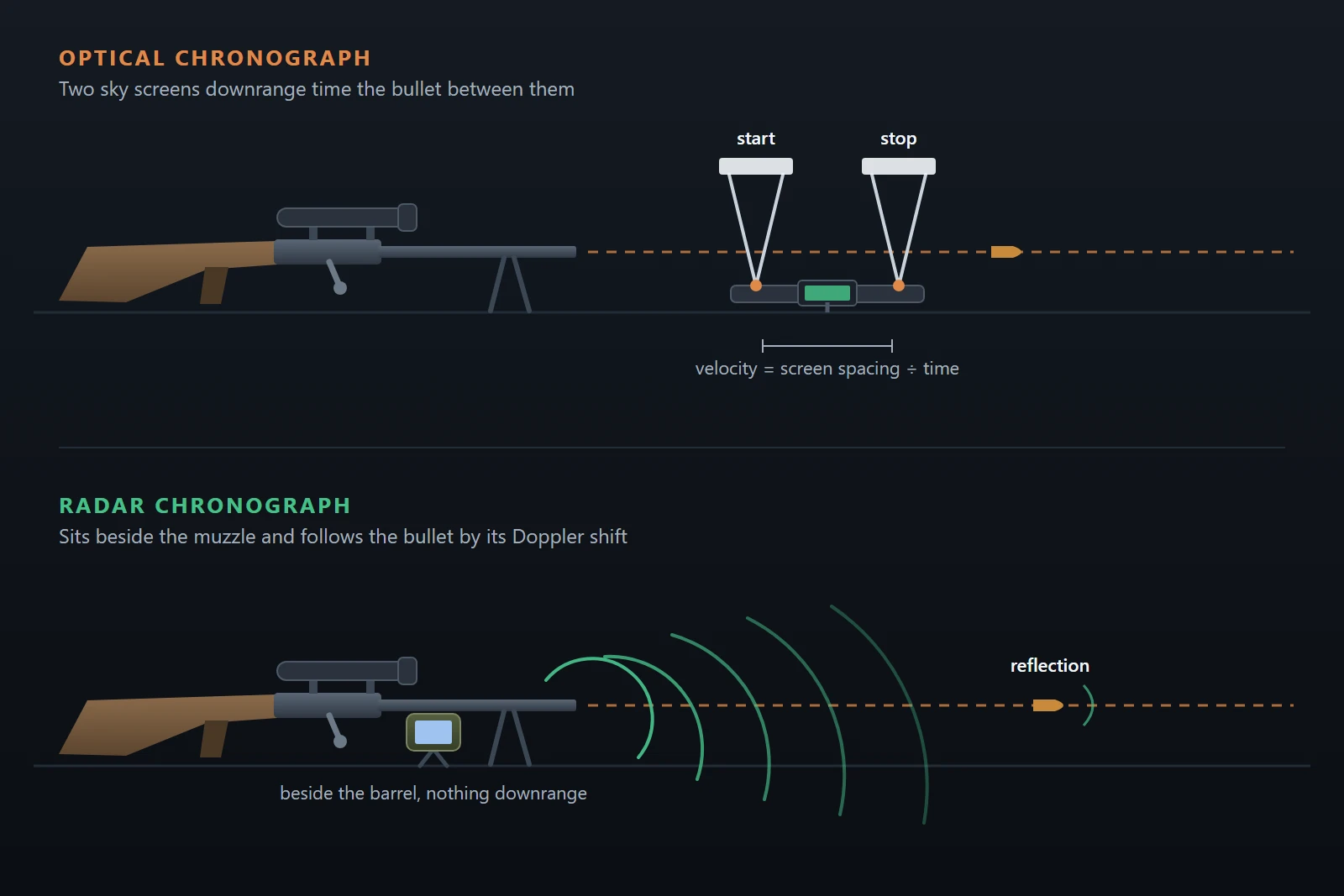
    There are two common kinds. Optical (skyscreen) chronographs detect the bullet’s shadow as it passes over light sensors; they are affordable but fussy about lighting and require you to shoot over the unit at the right height. Radar chronographs (such as the Garmin Xero or LabRadar) sit beside the muzzle and track the bullet with Doppler radar — far less sensitive to light and generally easier to use. If you use a Xero, see our guide on getting velocity data off your Garmin Xero.

    Setting it up correctly

    • Optical: place it the maker’s recommended distance from the muzzle (often around 10–15 feet), align so the bullet passes cleanly above the sensors — never so low you risk shooting the unit — and give it even, consistent light (overcast or the supplied diffusers).
    • Radar: position it beside and just behind the muzzle per the instructions, pointed downrange, and keep it square to the line of fire.
    • Either way, keep the unit in the same position for every string so your data is comparable.

    How many shots to record

    A two- or three-shot string tells you almost nothing about consistency. Record at least five shots, and ten or more if you want an SD you can trust — the same sample-size logic covered in what is a good SD for reloading. The more rounds behind the numbers, the more meaningful they are.

    Reading the numbers

    Look past the headline average. The SD tells you how consistent your velocities are, and it is the number that predicts vertical at distance; the ES is the simple high-minus-low and is jumpier from string to string. Single-digit SD is excellent; chase consistency, not just the fastest average.

    Common mistakes

    • Recording too few shots and drawing firm conclusions.
    • Bad or changing light on an optical unit, causing misreads.
    • Inconsistent placement between strings.
    • Treating an obvious misread (a wildly impossible number) as real data — cull genuine equipment errors, but never delete real shots just because they hurt your SD.
    • Shooting too close to or clipping the unit — check your alignment every time.

    Get the data into your log

    Numbers on the chronograph screen are useless once you pack up unless you record them against the load. LoadNode lets you sync velocities from a Garmin Xero or type them into the charge ladder, then computes live SD and ES per charge and ties them to the recipe — so your chronograph session becomes real load-development data, not a number you forget. Use it to hunt a velocity node with confidence.

    Handloading is an adult activity. LoadNode is a logbook and analysis tool — it never provides load data. Always develop loads from current published data, start low, and work up safely.

  • How to Choose Reloading Primers

    How to Choose Reloading Primers

    The primer is the smallest component in your cartridge and the easiest to take for granted — but the wrong one can spike pressure, raise your velocity spread, or simply not fit. Knowing how to choose reloading primers means matching the right size and type to your brass and load, and understanding when a magnum primer helps and when it hurts. Here is the practical rundown.

    LoadNode recipe screen with primer selection

    In this guide

    The four basic primer sizes

    Centerfire primers come in four common types: Small Rifle (SR), Large Rifle (LR), Small Pistol (SP), and Large Pistol (LP). The first rule is simple: the primer must match your case’s primer pocket. Most cartridges have a standard pocket size, but watch for exceptions — some match brass (certain 6.5 Creedmoor and other cases) is offered in a small-rifle-primer version even though the cartridge traditionally uses large rifle. Always confirm what your specific brass takes before you buy a brick.

    Rifle vs pistol primers (do not swap)

    Rifle and pistol primers are not interchangeable, even when the diameter looks the same. Rifle primers use thicker, harder cups built to handle higher chamber pressures, while pistol primers have softer, thinner cups. Putting pistol primers in a high-pressure rifle load is dangerous — the cup can pierce or fail. Use the primer type your load data specifies, full stop.

    Standard vs magnum primers

    Within rifle and pistol, you will also see standard and magnum versions. A magnum primer produces a hotter, longer-burning flame to reliably ignite large powder charges, ball (spherical) powders, or loads fired in cold weather. The trade-off: if your load does not need that extra ignition, a magnum primer can raise pressure and sometimes increase velocity spread. Match the primer to the powder and conditions — do not reach for magnum primers by default.

    How primers affect accuracy

    Primers are part of your ignition system, and ignition consistency feeds straight into velocity consistency. Swapping primer brands or even lots can measurably shift your SD and ES and move your point of impact. For that reason, precision shooters pick a primer and then stick with one lot through a load workup, treating a primer change as a real variable rather than a casual substitution.

    Choosing and changing primers safely

    • Start with the primer your published load data calls for, or a well-regarded match primer in the correct size.
    • Confirm the size against your actual brass — especially with small-rifle-primer match brass.
    • If you change primers, treat it like any component change: re-work the load and watch for pressure signs, because primer brisance affects pressure.
    • Buy enough of one lot to finish a project so your data stays consistent.
    • Handle and store primers carefully — they are sensitive, and they should be seated fully but never forced.

    Do not forget primer seating

    Which primer you pick matters, but so does how you seat it. Primers should be seated fully to the bottom of the pocket — just below flush with the case head — with a consistent feel. A high primer (sitting proud of the head) can cause misfires, inconsistent ignition, or in a worst case a slam-fire, and it will hurt your velocity consistency. Clean primer pockets so every primer seats to the same depth, and develop a feel for that firm, bottomed-out seat. Consistent seating is part of consistent ignition, and consistent ignition is what keeps your SD low.

    Track primers in LoadNode

    Because a primer (and its lot) can shift your results, it is worth recording. LoadNode stores the primer in each recipe alongside the bullet, powder, and brass, so when your SD changes you can see whether a primer swap was the reason. Pair it with disciplined brass prep for the most consistent ignition.

    Handloading is an adult activity. LoadNode is a logbook and analysis tool — it never provides load data. Always develop loads from current published data, start low, and work up safely.

  • Neck Tension and Bushing Dies: The Key to Consistent SD

    Neck Tension and Bushing Dies: The Key to Consistent SD

    If your velocities scatter more than your load deserves, the quiet culprit is often neck tension — how firmly the case neck grips the bullet. Get it consistent and your SD falls; let it wander and no powder tweak will fully fix it. Here is what neck tension really is and how bushing dies and mandrels help you control it.

    LoadNode charge ladder showing SD and ES, which consistent neck tension improves

    In this guide

    What neck tension is

    “Neck tension” is the grip the case neck exerts on the seated bullet. In practice it comes from interference fit — the neck is sized down a little smaller than bullet diameter, so it springs back against the bullet and holds it. Handloaders usually talk about it as the amount the neck inner diameter is sized below the bullet, commonly on the order of a thousandth or two of an inch. Strictly it is a grip force, not just a dimension, but the sizing amount is how we control it.

    Why it drives SD

    Consistent neck tension means each bullet releases at a consistent pressure, which makes your velocity consistent — the foundation of a low SD and ES. If some necks grip harder than others, those rounds build pressure differently and leave at different speeds, and your velocity spread opens up no matter how carefully you weighed the powder. Uneven neck tension is one of the most common hidden causes of a stubbornly high SD.

    Standard dies and the expander ball

    A conventional sizing die squeezes the neck down, then drags an expander ball back through it on the way out to set the final inner diameter. It works, but pulling that ball through can introduce inconsistency and neck runout, and it does not give you fine control over how much tension you end up with. For many shooters it is perfectly adequate; for those chasing single-digit SD, it is often the first thing to upgrade.

    Bushing dies

    A bushing die lets you drop in an interchangeable bushing of a specific diameter to size the neck to exactly the tension you want, often skipping the expander ball entirely. You choose the bushing based on your loaded neck diameter and brass spring-back (brass typically springs back around a thousandth after sizing), which gives you direct, repeatable control over neck tension — and usually better concentricity. Die makers such as those covered at Ultimate Reloader offer bushing options for most cartridges.

    Mandrels

    Another popular approach is an expander mandrel: size the neck slightly undersize, then open it back up from the inside with a mandrel to a precise diameter. Because the final sizing is done on the inside, any neck-thickness variation is pushed to the outside, leaving a uniform inner diameter and good bullet-to-bore concentricity. Many precision reloaders use a bushing to do most of the work and a mandrel to set the final tension.

    Annealing keeps it consistent

    No die can fully compensate for brass that hardens unevenly over its life. That is why annealing belongs in this conversation: it keeps the necks at a consistent springiness reload after reload, so the tension you set with a bushing or mandrel stays the tension you actually get. Bushing dies set it; annealing keeps it.

    Track it in LoadNode

    Neck-tension changes are just another variable to test, and the way to know if they worked is your velocity data. LoadNode computes live SD and ES per charge so you can see whether a die or mandrel change actually tightened your spread, alongside solid brass prep. Change one thing, measure, and let the numbers decide.

    Handloading is an adult activity. LoadNode is a logbook and analysis tool — it never provides load data. Always develop loads from current published data, start low, and work up safely.

  • Ballistic Coefficient and Twist Rate: Choosing a Bullet for Distance

    Ballistic Coefficient and Twist Rate: Choosing a Bullet for Distance

    Pick the wrong bullet for your barrel and no amount of load tuning will save you — it might not even stabilize. Understanding ballistic coefficient and twist rate is how you choose a bullet that both flies well at distance and actually stabilizes out of your rifle. Here is what each means and how they fit together.

    LoadNode recipe with bullet selection from the component library

    In this guide

    What ballistic coefficient (BC) is

    Ballistic coefficient is a measure of how well a bullet overcomes air resistance — essentially how aerodynamic it is. A higher BC means less drag, so the bullet retains velocity better, drops less, and drifts less in the wind the farther it goes. BC rises with a sleek, pointed, boat-tailed shape and with sectional density (heavier bullets for a given diameter). For the formal definition, see ballistic coefficient.

    G1 vs G7 BC

    You will see two BC numbers for many bullets. They are referenced to different standard projectile shapes: G1 is based on an older flat-based form, while G7 is based on a long boat-tail form that closely resembles modern long-range bullets. For sleek match bullets, the G7 BC stays more constant across the velocity range and predicts long-range trajectory more reliably, whereas the G1 BC for the same bullet changes more with speed. Rule of thumb: for long-range bullets, prefer the G7 number and feed it to a matching G7 ballistic solution.

    Twist rate and bullet stability

    Twist rate — written like 1:8 (one full rotation in eight inches) — is how fast the rifling spins the bullet, and that spin is what stabilizes it gyroscopically in flight. A faster twist is a smaller number (1:7 is faster than 1:10). The key relationship: longer, heavier bullets need faster twist to stabilize. Too slow a twist for a long bullet and it will not stabilize — you will see keyholing and terrible accuracy as the bullet tumbles.

    The stability factor (Sg)

    Stability is quantified by the gyroscopic stability factor (Sg). Below about 1.0 the bullet is unstable; most authorities want roughly 1.4–1.5 or higher for full stability and to realize the bullet’s full BC. Marginal stability (around 1.0–1.4) can leave a bullet flying but underperforming, shaving its effective BC. You can estimate Sg with a stability calculator from your twist, bullet length, velocity, and conditions before you ever buy the bullets.

    Matching the bullet to your barrel

    Bullet for the caliberTwist needed
    Light / shortSlower twist is fine (larger number)
    Mid-weightMedium twist
    Heavy / long, high-BCFaster twist (smaller number)

    In short: choose the highest-BC bullet your barrel’s twist can fully stabilize. If your twist is on the slow side, you are limited to shorter, lighter bullets; a fast twist opens the door to the heavy, high-BC projectiles that shine at distance. Always check the bullet maker’s recommended minimum twist for the bullet you want.

    Air density changes stability

    Stability is not fixed — it changes with the air. Thinner air (high density altitude: hot or high elevation) makes a bullet easier to stabilize, raising Sg; cold, dense air lowers it. A bullet that is marginally stable on a freezing morning at sea level may be perfectly fine on a hot day in the mountains — and vice versa. When in doubt, give yourself stability margin. Record your chosen bullet and its BC in your LoadNode recipe so it travels with the load.

    Handloading is an adult activity. LoadNode is a logbook and analysis tool — it never provides load data. Always develop loads from current published data, start low, and work up safely.

  • Barrel Break-In: Necessary or Myth?

    Barrel Break-In: Necessary or Myth?

    Few topics start an argument faster among shooters than barrel break-in. One camp swears a careful shoot-and-clean ritual makes a barrel foul less and shoot better; another calls it a waste of barrel life and cleaning solvent. So which is it? Here is an honest look at what break-in is, the case on each side, what the evidence really supports, and a sensible way to handle a new barrel.

    LoadNode barrel profile tracking round count from the very first shot

    In this guide

    What barrel break-in is

    A typical break-in procedure is a series of shoot-and-clean cycles: fire one shot, clean the barrel thoroughly (including copper), and repeat for several rounds; then fire short groups of two or three, cleaning between, for a while longer. The idea is to smooth the tiny machining marks in the throat and bore while they are fresh, so the barrel fouls less and cleans more easily over its life. Procedures vary widely from one source to the next, which is itself a clue about how settled the science is.

    The case for break-in

    Proponents argue that a fresh throat has microscopic tool marks and burrs that grab copper. Firing and cleaning early, the theory goes, lets the bullet gently lap those high spots down before fouling builds up in them, leaving a smoother bore that copper-fouls less and is easier to maintain. Shooters who break barrels in often report exactly that — less fouling and quicker cleaning afterward. Rougher, mass-produced factory barrels are the ones most likely to show a difference.

    The case against

    Skeptics, including a number of respected custom barrel makers argue that a properly finished, lapped barrel has little to gain, and that burning rounds and aggressively cleaning a new barrel mostly wastes a slice of its finite life. Their point: every shot is a shot off the clock, and scrubbing a throat hard does not obviously help a barrel that was already smooth from the maker. For premium hand-lapped barrels, many makers say little or no break-in is needed.

    What the evidence actually says

    Honestly, the hard evidence is thin and mixed. Most support for break-in is anecdotal, and controlled testing is scarce and inconsistent. What nearly everyone agrees on is narrower: quality matters. A smoothly finished barrel needs little; a rough one may benefit from a light break-in. And regardless of break-in, cleaning a new barrel and watching how it fouls is just good practice.

    A sensible approach

    • Follow your barrel maker’s specific recommendation first — they know how that barrel was finished.
    • For a premium, hand-lapped barrel, a brief routine (or none) is usually plenty.
    • For a rougher factory barrel, a light shoot-and-clean break-in is reasonable — just don’t turn it into a 100-round ritual.
    • Clean copper out early and note how quickly it returns; that tells you when the bore has settled.
    • Don’t chase accuracy conclusions during break-in — the barrel and your zero are still settling.

    Count break-in rounds toward barrel life

    Whatever you decide, those rounds count. LoadNode tracks round count per barrel from the very first shot, so your break-in is part of the barrel’s life record — useful later when you are watching for throat erosion and trying to judge how much accurate life is left. Log it, and let the data tell the story instead of guesswork.

    Handloading is an adult activity. LoadNode is a logbook and analysis tool — it never provides load data. Always develop loads from current published data, start low, and work up safely.

  • Density Altitude for Shooters: What It Is and Why It Matters

    Density Altitude for Shooters: What It Is and Why It Matters

    Two range days, same load, same distance — and your come-ups are different. Often the reason is density altitude. It is the single number that captures how thin or thick the air is, and at distance it quietly rewrites your dope. Here is what DA is, what drives it, and why it matters more the farther you shoot.

    LoadNode load job showing range conditions including density altitude

    In this guide

    What density altitude is

    Density altitude (DA) is the altitude, in a standard atmosphere, at which you would find the air density you are actually experiencing. In plain terms it rolls temperature, barometric pressure, and humidity into one figure that tells you how dense the air is. “High” DA means thin air; “low” DA means dense air. It is the same concept pilots use, defined formally as density altitude.

    Why it matters for shooting

    Air is what slows your bullet down. Thinner air (high DA) means less aerodynamic drag, so the bullet retains velocity better, drops less, and drifts less — your trajectory flattens. Denser air (low DA) means more drag, more drop, and more wind deflection. Up close this is invisible; stretch out past a few hundred yards and a big DA swing can move your elevation by a meaningful amount. A dope card trued on a cold morning at sea level will not match a hot afternoon in the mountains.

    What drives density altitude

    • Temperature: hotter air is less dense, so heat raises DA.
    • Altitude / pressure: higher elevation (lower pressure) raises DA.
    • Humidity: humid air is actually less dense than dry air — water vapor is lighter than the nitrogen and oxygen it displaces — so higher humidity nudges DA up a little.

    Put simply: hot, high, and humid all push DA up (thin air); cold, low, and dry pull it down (dense air).

    Using DA at the range

    Practical shooters record the conditions or the DA directly when they shoot, and true their ballistic solution to them. When the air changes, the solution changes. Note that DA is about air density, not shooting up- or downhill; that angle effect is a separate correction. Modern ballistic apps will take current atmospherics directly, but the habit that matters is logging the conditions alongside your results so your data means something later.

    A quick example

    Say you true your dope on a cold morning near sea level, low density altitude, dense air. Then you drive to a hot, high range and the air thins out: density altitude climbs, drag drops, and your bullet now falls less than your card predicts. Fail to adjust and you will shoot high — and at long range the gap can be on the order of a couple of MOA, depending on the cartridge and how large the DA swing is. The fix is simply truing your solution to the conditions in front of you, not the ones from last week.

    Track conditions in LoadNode

    LoadNode records each session’s conditions — temperature, humidity, pressure, and density altitude right alongside your velocities and groups in the load job. That way, when you compare two strings shot on different days, you can see the air they were shot in, not just the numbers. Pair it with a temperature-stable powder (see finding a velocity node) to keep your load consistent as conditions move.

    Handloading is an adult activity. LoadNode is a logbook and analysis tool — it never provides load data. Always develop loads from current published data, start low, and work up safely.

  • Annealing Brass: Why and How

    Annealing Brass: Why and How

    If your loads seem to drift after a few reloads — SD creeping up, the occasional split neck — the culprit is often work-hardened brass. Annealing brass resets that hardening so your neck tension stays consistent and your cases last longer. Here is why it works, how to do it, and the safety rule you must not break.

    LoadNode charge ladder showing SD and ES, which annealing helps keep low

    In this guide

    Why brass needs annealing

    Brass work-hardens every time it is fired and resized — the metal gets stiffer and springier with each cycle. Left unchecked, the case necks grip the bullet with steadily changing force from one reload to the next, and eventually they get brittle enough to crack and split. Annealing softens the neck and shoulder back toward a consistent state, restoring uniform behavior and extending case life. The metallurgy is the same annealing used across metalworking.

    How annealing helps accuracy

    The payoff for precision is consistent neck tension. How tightly the neck holds the bullet affects how the bullet releases and how pressure builds, which feeds straight into velocity consistency. Brass that is annealed on a schedule releases bullets more uniformly, so your SD and ES stay low and stable instead of wandering as the brass hardens over its life.

    Temperature and what not to do

    Annealing is about getting the neck and shoulder to the right temperature for a brief moment — commonly cited around 700–800°F for a short dwell, not a bright glow. Too little does nothing; too much ruins the brass. Use temperature-indicating lacquer (Tempilaq) or a machine for repeatability. The unbreakable rule: never let heat reach the case head or body. The head must stay hard to safely contain pressure — a softened case head is dangerous. Keep the heat at the neck and shoulder, and keep it brief.

    Annealing methods

    • Flame (a torch with a case spinner, checked with Tempilaq): inexpensive and effective, but harder to make perfectly repeatable shot to shot.
    • Salt bath: a molten-salt dip — effective but messy and less common today.
    • Induction (e.g., AMP-style machines): heats by electromagnetic induction for highly repeatable, consistent results — the gold standard, at a price.

    How often to anneal

    For top-end consistency, many precision shooters anneal every firing; others do it every two or three. What matters most is doing it on a consistent schedule so every case in a batch has seen the same treatment — uniformity across the batch is the goal, not a magic interval.

    Do you actually need to anneal?

    Honestly, not everyone does. If you load plinking ammo and retire brass after a few firings, you can skip annealing and never notice. Where it earns its keep is precision and brass economy: if you are chasing single-digit SD across many reloads, or you have invested in premium brass you want to last, consistent annealing keeps neck tension — and therefore your velocity — stable over the life of the case. Match the effort to your goal: casual volume shooting, optional; serious precision, well worth it.

    Track firings in LoadNode

    Annealing only helps if it is consistent, which means knowing how many times each batch has been fired. LoadNode lets you record brass lots and prep in your recipes, so you can keep your annealing on schedule. Pair it with solid brass prep and watch your SD settle down.

    Handloading is an adult activity. LoadNode is a logbook and analysis tool — it never provides load data. Always develop loads from current published data, start low, and work up safely.

  • Brass Prep for Accuracy: A Step-by-Step Checklist

    Brass Prep for Accuracy: A Step-by-Step Checklist

    Consistent ammunition starts with consistent brass. Good brass prep is the unglamorous work that quietly lowers your SD, tightens your groups, and makes your cases last — and it is mostly about doing the same thing the same way every time. Here is a clear, step-by-step checklist, plus an honest note on which steps actually matter.

    LoadNode recipe screen with brass and lot tracking

    In this guide

    Why brass prep matters

    Every dimension that varies from case to case — neck tension, case volume, shoulder position, trim length — adds variation to your ammunition, and variation is the enemy of precision. Uniform brass means more uniform pressure and velocity, which shows up as a lower SD and ES and tighter groups. It also keeps your cases alive longer. And good prep stretches your brass budget — well-prepped, annealed cases can be reloaded many times before they are retired, which matters when quality match brass is not cheap and supply can be tight.

    The brass prep checklist

    1. Clean the brass (tumble, ultrasonic, or wet) so grit does not scratch your dies or chamber.
    2. Inspect and cull — toss any case with neck cracks, head separation signs, or loose primer pockets.
    3. Resize with lube. For repeatable feeding and good brass life, full-length size and set your shoulder bump back a thousandth or two from fired length.
    4. Deprime (usually done during sizing).
    5. Trim to length. Brass flows forward when sized, so trim to a uniform length at or below max case length — consistent length means consistent case mouths.
    6. Chamfer and deburr the case mouth so bullets seat smoothly without shaving.
    7. Clean the primer pockets so primers seat to a uniform depth.
    8. Anneal periodically to keep neck tension consistent (more below).

    Optional precision steps — uniforming primer pockets, deburring flash holes, sorting brass by weight or volume, neck turning for tight-neck chambers, or using an expander mandrel for uniform neck tension — can help at the margins, mostly for benchrest-level work.

    Which steps actually matter

    If you are chasing diminishing returns, prioritize the steps that move SD: consistent sizing (shoulder bump), uniform trim length, consistent neck tension, and annealing. These directly affect how the round chambers and how the bullet releases. The fancy extras — neck turning, flash-hole deburring — matter far less for most shooters than simply doing the core steps the same way every single time. Consistency beats elaborateness.

    Common brass-prep mistakes

    Most brass-prep problems are habits, not skill:

    • Inconsistent shoulder bump — resetting your sizing die differently each session changes how the round chambers and adds variation.
    • Too much (or leftover) case lube — over-lubing dents shoulders; failing to clean it off invites slipping and grit.
    • Skipping the trim — cases that grow unevenly give you uneven mouths and inconsistent seating.
    • Mixing headstamps and lots — different brass has different capacity and weight, so keep batches separate.
    • Never annealing — letting neck tension drift over a dozen reloads.

    None of these are hard to avoid; they just take a little discipline and the same routine every time.

    Track your brass in LoadNode

    LoadNode lets you record your brass and lots in each recipe, note how many times a batch has been fired, and amortize brass cost across its life. Tie that to your velocity stats and you can actually see whether your prep is paying off in lower SD. Next, read up on annealing cartridge brass — the step that keeps neck tension consistent over the life of your brass.

    Handloading is an adult activity. LoadNode is a logbook and analysis tool — it never provides load data. Always develop loads from current published data, start low, and work up safely.

  • Best Reloading Log Apps in 2026

    Best Reloading Log Apps in 2026

    A good reloading logbook turns a pile of range notes into something you can actually learn from. If you are hunting for the best reloading log app, here is an honest look at the popular options in 2026 — what each is genuinely good at, and where it falls short. (Full disclosure: LoadNode, included below, is our app — we have tried to be fair about everyone, including ourselves.)

    LoadNode reloading log app showing firearms, recipes and load jobs

    In this guide

    What to look for in a reloading log app

    • Real logging: firearms, recipes (bullet/powder/primer/brass), and load jobs — not just a notes field.
    • Velocity stats: live SD and ES, computed correctly.
    • Group tracking: ideally measuring group size from a photo and tying it to the load.
    • Offline: the range rarely has signal.
    • Cost & honesty: a fair price model, and a tool that helps you read your data — not one that tells you what to load.

    The popular options

    RCBS Reloading — free, and a familiar name. Its load log lets you record components, charge, velocity, and group, and attach a photo. A solid, simple free logbook, light on analysis.

    Vihtavuori Reload — free and notably polished, with a load diary that records test-shooting data and automatic velocity statistics. The catch: it is built around Vihtavuori powders, so it is less neutral if you burn other brands. Read more at Vihtavuori.

    Hornady Reloading — primarily a reloading-data and guide app; useful for looking things up, more reference than a personal logbook.

    Reloading Assistant — a capable logbook that ties together recipes, cost records, and chronograph data in a diary format.

    Reloading Studio — modern, web-based software for managing, tracking, and cataloguing your whole reloading workflow, components, and firearms; more of a desktop manager than a range-side phone app.

    Ballistic-X — excellent at one thing: measuring group size from a photo of your target. It is a target analyzer rather than a full reloading log.

    LoadNode (ours) — built to close the whole bench-to-target loop: recipes and load jobs, charge ladders with live SD/ES, Garmin Xero sync, photo group measurement in MOA and MIL, AI group analysis, and cost tracking — offline-first, a one-time purchase with no subscription, and it never gives load data.

    Comparison at a glance

    AppTypeBest for
    RCBS ReloadingFree logbookSimple, free logging with photos
    Vihtavuori ReloadFree (VV powders)Vihtavuori shooters wanting a clean diary
    HornadyData / guideLooking up reloading data
    Reloading AssistantLogbook + cost + chronoComponent- and cost-focused logging
    Reloading StudioWeb softwareDesktop workflow & inventory management
    Ballistic-XPhoto group analyzerMeasuring groups from a photo
    LoadNodeIntegrated bench-to-targetThe whole workflow, offline, one-time

    App details and pricing change — check each one’s current store listing before you commit.

    One more thing worth weighing: the pricing model. The market splits between free apps, one-time purchases, and subscriptions — and most handloaders strongly prefer to buy once and own their logbook rather than pay every month to keep access to their own data. If you are choosing a tool you will lean on for years, factor that in alongside the feature list.

    Which is best for you?

    If you want a free, no-frills logbook, RCBS is a safe start. Shoot Vihtavuori exclusively? Vihtavuori Reload is hard to beat for free. Want a desktop inventory manager, Reloading Studio; just measuring groups, Ballistic-X. If you want one app that does the entire precision workflow — recipes, live velocity stats, chronograph sync, group measurement, and cost — without a subscription, that is what we built LoadNode to be. Browse our reloading resources to see how the pieces fit together.

    Handloading is an adult activity. LoadNode is a logbook and analysis tool — it never provides load data. Always develop loads from current published data, start low, and work up safely.

  • How to Get Velocity Data Off Your Garmin Xero

    How to Get Velocity Data Off Your Garmin Xero

    The Garmin Xero C1 is one of the easiest, most accurate chronographs you can put on a bench — but its velocity numbers are only useful if they make it into your load record. This guide explains how the Xero captures data, how the ShotView app fits in, and the options for getting those velocities into your reloading log without fat-fingering every number.

    LoadNode connected to a Garmin Xero C1 chronograph over Bluetooth

    In this guide

    How the Garmin Xero works

    The Garmin Xero C1 is a compact Doppler radar chronograph. You set it beside the muzzle, and for each shot it measures muzzle velocity directly — no shooting through fragile optical sensors or skyscreens. It records each shot in a session and computes the string statistics you care about on the device itself: average velocity, standard deviation, and extreme spread, among others.

    The ShotView app

    The Xero pairs over Bluetooth with Garmin’s free ShotView app on your phone, where you can watch shots land in real time, name and review sessions, and see their stats. ShotView is a great companion for the chronograph, but it is not a reloading log — it does not know your charge weight, seating depth, primer, or which group those velocities produced. For details on the device and app, see Garmin support.

    Option 1: manual entry

    The simplest path is to read the velocities — off the Xero screen or in ShotView — and type them into your logbook or reloading app by hand. It works with any chronograph, but it is slow, and it is easy to transpose a digit on a cold, windy range. For a quick few shots it is fine; for a full charge ladder across many charges, it gets tedious fast.

    Option 2: automatic sync into your log

    The better path is to pull the Xero’s saved session straight into your load record over Bluetooth. LoadNode does this with the Xero C1: shoot your string, end the session on the Xero, then tap Sync in your charge ladder and pick the session — every shot drops into the right charge, no transcription. The velocities arrive already attached to the load that produced them.

    Why linking velocity to the load matters

    A velocity number on its own is trivia. Tied to a specific charge, seating depth, and group, it becomes load development. With the data in your log you can compute a meaningful SD, hunt for a velocity node, and correlate velocity with where the shots landed. That correlation is the whole point of chronographing in the first place.

    Tips for clean chronograph data

    A few habits make your velocity data trustworthy. Place the Xero in a consistent position relative to the muzzle each time, shoot enough rounds for a meaningful SD (five is a minimum, ten is better), and end the session on the Xero before you sync so the string is complete. Above all, keep track of which charge each session belongs to so nothing gets mixed up later. Garbage in, garbage out applies to chronograph data as much as anything — one tidy, complete session is worth more than three rushed ones.

    The Garmin Xero in LoadNode

    In LoadNode, the Xero C1 connects over Bluetooth and feeds your charge-ladder session directly: live SD and ES update as the shots come in, and the string is linked to your recipe, charge, and the group you measured. Support for the Garmin Xero C2 and other chronographs is on the way. Either way, you can always enter velocities by hand on a glove-friendly keypad if you prefer. LoadNode organizes your data; it never tells you what to load.

    Handloading is an adult activity. LoadNode is a logbook and analysis tool — it never provides load data. Always develop loads from current published data, start low, and work up safely.